Phil MacArthur On The Web
Introduction
Here is a project I did for a technical writing class. It consists of an informational page, followed by a description of the development process and my design decisions. The company named in the informational page, PMSounDesign, is fictitious.
Informational Page Sample
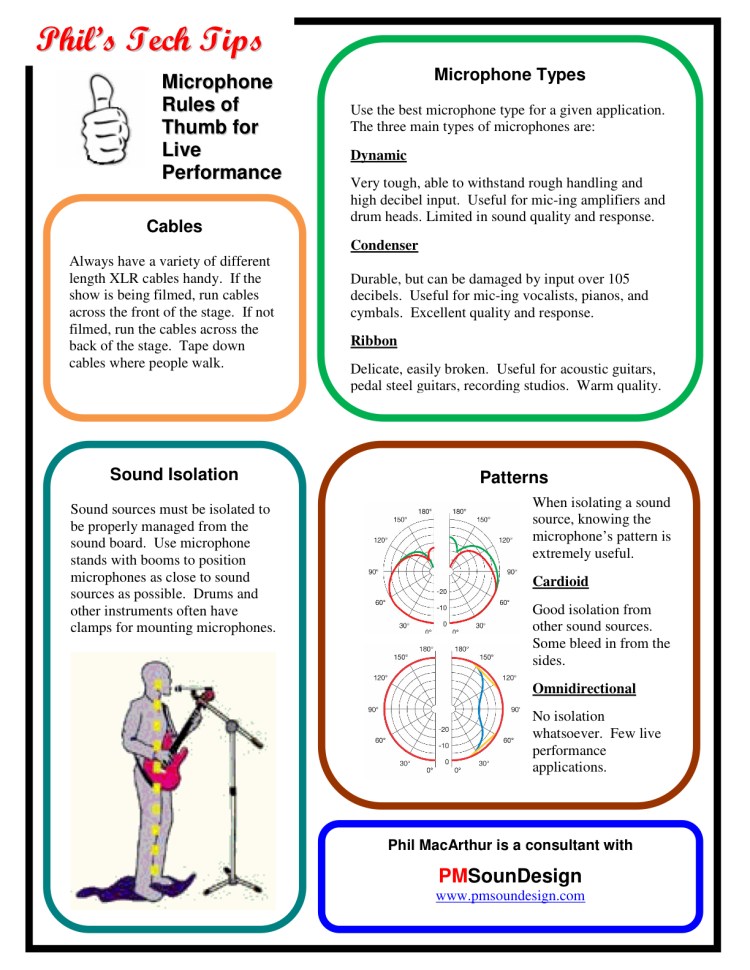
Informational Page Description
The main objectives of the page are to provide quick, concise access to the information, and to be readable in low light situations that sound techs often work in. This is why there is significant white space around the text and graphics. All the graphics are large and easy to read in limited light. I used a simple grid pattern for the page layout, with three vertical grids and three horizontal grids. This creates a symmetry that is easy on the eye, and two sections are offset from the horizontal grid so the page doesn’t look mechanical. The sheet’s title, “Phil’s Tech Tips,” is very easy to see because it’s located in the upper left corner, printed in a large script font, colored red, and inset into the page border. I want to call attention to the title of the sheet, as this will help readers locate the main theme of the information sheet, which is “Microphone Rules of Thumb for Live Performance.” The title also has an element of name recognition because it contains my first name.
The document border is six points thick, with squared corners. I made the corners square to contrast with the section borders, which are rounded, and I pushed the document border out to the print limits to leave as much space on the page for content as possible. The section borders are all six points thick, as I want them to have the same level of importance as the page border, and to have the same level of importance in relationship to each other. Rather than creating a visual hierarchy, the borders simply delineate the content, so as not to distract from the content. The readers’ eyes are not drawn to any particular section, causing them to scan the headings. They can do this quickly, because there are only five sections, and the sparse layout helps them find the information they need.
The contrast between the white page background and the black document border helps the border to stand out, making it easy to find the limits of the page. I kept the section border colors earthy, as I wanted them to be easy on the eye and not to distract the reader from the information in the section. The section borders are pleasant yet subtle, helping the reader to stay focused on the message contained within the border. Rather than use color fills for the sections, I left the background as white space, to make the text easier to read in low light.
The graphics I used in the “Patterns” section illustrate microphone patterns to the reader. Both their size and colors make it easy to see the difference between the two patterns. Although there are a multitude of microphone patterns, I chose the cardioid and omnidirectional patterns because of the extreme visual contrast between them. This contrast illustrates my point that sound techs need to understand the patterns for the microphones they are using, or they may not get the results they are expecting. The image of the singer with a microphone stand in the “Sound Isolation” section demonstrates how a microphone stand boom can be used to get a microphone close to a sound source – in this example, the singer’s mouth. The Thumbs Up graphic in the document title area is a visual play on the “Rules of Thumb” portion of the title. It creates a positive emotional response, as the “thumbs up” sign indicates that everything is working well.
This sheet is targeted for new sound techs. The real estate on the page is constrained, so I picked the four points – Microphone Types, Patterns, Cables, and Sound Isolation – as they are crucial to sound reinforcement, they are all pertinent to the use of microphones, and they can be illustrated in a single page. In each of these subject headings, I included only the most significant rules of thumb, due to space restrictions and the need for the document to be readable in minimal light. I chose the theme, “Microphone Rules of Thumb for Live Performance,” because there are no hard and fast rules for using microphones. Every live performance has its unique sound situations, and it is better to give sound techs rules of thumb, than it is to give them hard and fast rules that don’t work in all situations. Although its primary purpose is as a job aid, the Tech Tips sheet will also remind sound techs that I am available for consulting.
I gave significant consideration to the design of the Tech Tips sheet. Everything on it is there to help the sound techs do their jobs, to be easy to use, and to provide the most important information concerning the selection and use of microphones in a live performance situation. The sound techs are better served by the Tech Tips sheet than by a big manual because the Tech Tips are more useful than large manuals in a live performance situation. Manuals are big and bulky, and they aren’t much good when you’re in a hurry and/or working in a low light situation, whereas the Tech Tips sheet can sit right on the sound board, and is designed to be readable in low light. The sound techs benefit by having the information they need in a handy, useful form; my clients benefit because it takes less time to get their shows set up, leaving more time for perfecting the mix; and I benefit because my company name is in front of my clients and their techs. This is an inexpensive way to provide additional service to my clients, and when they need consulting services, my contact information will be right there in front of them.
Me and a Somewhat Wooden Acquaintance

 Phil MacArthur On The Web
Comments are closed.